 SkySoft
 AI usage monitor · Mac
Your remaining AI quota,
always on screen
UsageKit gathers the usage limits of AI coding tools like Claude and Codex into one place. It pins to any edge of your Mac screen, and as a limit runs low the ring turns from amber to red.

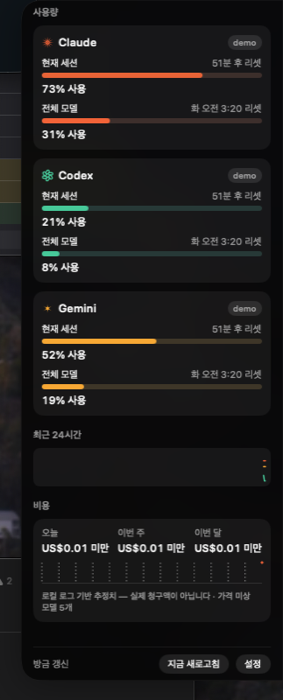
Know before you hit the limit
Always-on ring gauges
One ring per provider. As the remaining quota shrinks the color shifts from amber to red, so you can read the state without reading a number.
Snaps anywhere
Any of the four screen edges, beside the notch, or free-floating. Dragging previews where it will snap, it returns there after a restart, and it never gets lost when an external display is unplugged.
Hover for detail, click to expand
Hover for per-window usage (5-hour session and weekly) and time until reset. Click for a sparkline history and a cost estimate computed from local logs.
Threshold alerts
Get notified once at 80%, 95% or any point you choose. The same threshold never fires twice.
Uses your existing sign-ins
Reads the credentials Claude Code and the Codex CLI already saved, read-only. No separate account, no setup.
English · Korean
Follows your system language. Polling defaults to every 5 minutes, with a 3-minute minimum.
Supported services
UsageKit reads the credentials each tool already stores, read-only. It uses the sign-in your CLI or app saved and never modifies it.
| Service | Credential source |
|---|---|
| Claude Code | Environment variable → credentials file in the config directory → Keychain. Read-only |
| Codex | ~/.codex/auth.json |
| Cursor · Grok · Aside | Sign-in files each app or CLI keeps in your home folder. Read, never modified |
UsageKit uses undocumented APIs. The usage endpoints are the internal ones each CLI uses to show its own usage, and they may change or be blocked without notice. When that happens UsageKit shows "no reading" rather than a wrong number. It never sends more requests than using the CLI itself would.
Tokens never leave your device
Zero telemetry
No analytics SDK, no crash reporter, not one line of usage statistics. No third-party code is linked into the binary.
Talks only to each service
Connects directly from your Mac to each AI service, only to refresh the sign-in and read usage. Requests to any other host are blocked in code.
What it reads from logs
With cost estimation on, it reads only model ID, timestamp and token counts from local session logs. Conversation text and file paths have no field in the parsed output at all.
Tokens are stored only in the Keychain and are never written to disk, logs or the screen. Deleting the app removes everything. See the Privacy Policy for details.
Download
Free on the Mac App Store. Requires macOS 14 Sonoma or later; Apple Silicon and Intel are both supported.
Reading the Claude credential from the Keychain triggers a system permission prompt once. The first-run onboarding explains why before any polling starts.